Hoursmith for Chrome
Your workday, one click away.
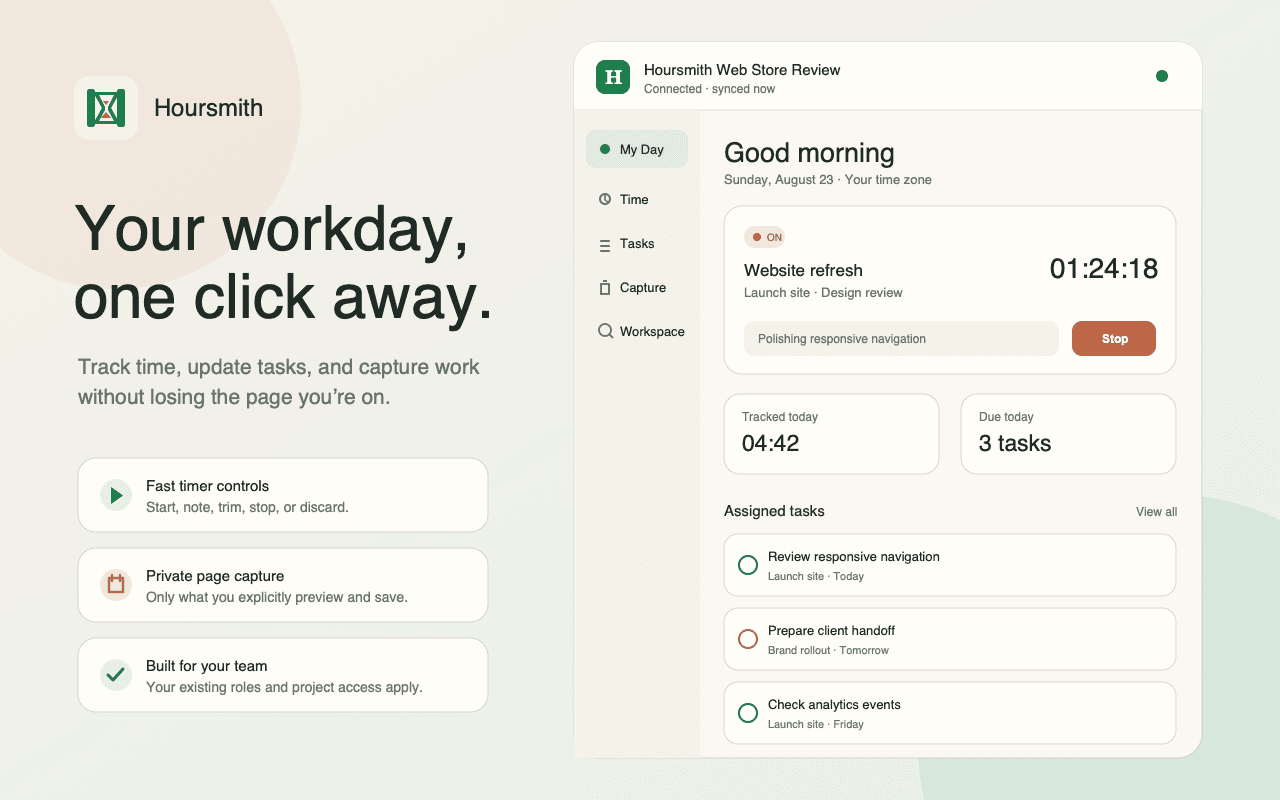
Start timers, update tasks, log time, and capture work without leaving the page you are on. Hoursmith for Chrome keeps the same workspace, permissions, and billing rules beside your browser work.
Plans: Free · Studio · Agency
Free extension · Every Hoursmith plan · Chrome 120+
At a glance
| Availability | Free, Studio, and Agency |
|---|---|
| Browser | Google Chrome 120 or newer |
| Surfaces | Toolbar popup and persistent side panel |
| Work actions | Timers, manual time, assigned tasks, captures, and workspace search |
| Connection | Workspace-scoped device approval with switching and disconnect controls |
| Page capture | Explicit gesture, editable preview, then an intentional save |
What's in it
Fast timers from the toolbar
Start, edit, stop, or discard a timer without changing tabs. Search and choose each project or task in one field instead of juggling a separate search box and selector.
A side panel for the whole workday
Keep My Day, Time, Tasks, Quick capture, and Workspace search open beside the page you are working on. Open the full Hoursmith record only when deeper work is needed.
Manual time and resilient notes
Log completed work, update the running note, and keep bounded timer or note actions queued during a temporary connection loss. Conflicts stay visible instead of silently overwriting server state.
Assigned work and workspace search
Review assigned tasks, update the supported task fields, and search accessible clients, projects, tasks, time, expenses, and invoices. Results always follow your existing workspace role and project access.
Private capture only when you ask
An explicit toolbar or context-menu gesture can prepare the current page title, sanitized URL, favicon URL, and selected plain text. You see and can edit the preview before anything is saved to Hoursmith.
The same workspace rules everywhere
The extension uses the same projects, tasks, time entries, billability rules, locks, and role boundaries as the web app. It does not create a second copy of your work or a weaker permission model.
How it works
- 01
1. Add Hoursmith from the Chrome Web Store
Open the verified listing, choose Add to Chrome, and optionally pin the Hoursmith icon for one-click toolbar access.
- 02
2. Connect your Hoursmith account
Choose Connect Hoursmith. Sign in in the Hoursmith window, select a team workspace, and approve this browser device.
- 03
3. Start from the popup or side panel
Use the popup for a quick timer or capture. Open the side panel when you want My Day, manual time, tasks, Quick capture, or workspace search to stay beside your current tab.
- 04
4. Switch when your work changes
Use the workspace switcher to move between connected workspaces, connect another one, or choose Use a different account to open the Hoursmith account chooser—without reinstalling the extension or removing existing connections.
- 05
5. Disconnect whenever you want
Open the extension settings and disconnect a workspace to revoke that device grant and clear its cached extension data. Your saved Hoursmith records remain in the workspace.
What Hoursmith is not
Hoursmith for Chrome is a focused companion, not a replacement for the full web app. Invoice construction and sending, payments, reports, imports, and administration stay on the web. It does not provide automatic time tracking, idle detection, full offline editing, a client portal, AI, or background browsing-history collection.
Common questions
How much does the Hoursmith Chrome extension cost?
The extension is included on Free, Studio, and Agency. An Hoursmith account and access to at least one team workspace are required; the extension does not add a separate subscription.
Which browsers are supported?
The published extension supports Google Chrome 120 and newer. Hoursmith does not currently promise dedicated Firefox, Safari, Edge, iOS, Android, or desktop-app builds.
Can I switch workspaces or use a different Hoursmith account?
Yes. Switch among connected workspaces from the workspace menu or connect another workspace. Choose Use a different account to open the Hoursmith account chooser and approve a workspace from another login without first removing your existing connections.
What happens when I disconnect?
Disconnecting revokes that browser device for the workspace and clears its extension credentials, cached workspace data, pending capture, and queued offline timer or note changes. It does not delete tasks, time entries, expenses, or other saved workspace records.
Does Hoursmith read every page I visit?
No. Hoursmith has no history API, persistent content script, or background-page observation. Page context is available only after an explicit toolbar or context-menu gesture, and the editable preview appears before you save it. See the privacy policy for the exact data and retention boundaries.
Can I build and send invoices inside the extension?
No. The extension keeps frequent work actions close—time, assigned tasks, captures, and lightweight workspace lookup. Invoice construction and sending, payments, reports, imports, and administrative settings remain in the Hoursmith web application.
Related
Keep Hoursmith beside the work.
Install the Chrome companion, connect your workspace, and start your next timer without leaving the page you are on.
Free extension · Hoursmith account required · Chrome 120+